
Security & CamerasArticle
Where to actually put home security cameras, and where they are a waste of money
By DIGIMAX Team · 12 May 2026
By DIGIMAX Team · 12 May 2026
This article is the one we wish every customer read before they bought cameras. The biggest waste of money in a smart home is buying too many cameras and putting them in the wrong places. After hundreds of installs we have a settled answer about what actually earns its keep.
For a typical Sri Lankan house, 4 cameras is the right number. More than 6 and the family stops checking the app, which defeats the point.
The four positions that work, in order:
Indoor cameras are a separate decision and most families do not need them. We cover that below.
This is the single most useful camera in any house. Mounted above or on the gate pillar, pointed slightly down, covering the road in front. Catches everyone who walks past, every delivery, every visitor before they ring the bell.
Two practical notes. First, this camera should have a real night mode, not just IR illumination. Streetlight in most Colombo and suburban neighbourhoods is enough for a colour-night-vision camera to give you usable footage. Second, the angle matters more than the megapixel count. A 4MP camera pointed correctly will outperform an 8MP one mounted too high.
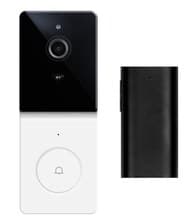
This is usually a video doorbell rather than a wall-mounted camera. It does two jobs: shows you who is at the door from your phone, and records every approach to the door whether they ring or not.
A video doorbell on the front door is the most-used camera in any house we install. Family checks it every day. The gate camera is for security. The doorbell camera is for daily life.
Almost every Sri Lankan property has a second way in. A side gate to the maid's quarters, a back lane behind the garden wall, a service entrance, a kitchen door to the alley. This is the position thieves test. A camera here, often missed.
If the rear access has no power point nearby, an outdoor solar Wi-Fi camera is the right answer. They run independently, charge in normal Sri Lankan light, and need no trenching. We use them on back walls and outbuildings.
A wide-angle PTZ camera (pan-tilt-zoom) covering the open ground between the gate and the house. If the property is small and the porch camera covers most of this area, you can skip this one. If the property is over 8 perches with a real driveway, it is worth it.
Auto-tracking is genuinely useful here. The camera follows a person walking across the driveway and gives you continuous footage rather than 6 disconnected motion clips.
One indoor camera in the main living area is enough for families with a baby, an elderly parent, or pets that need watching. Two is rarely useful. Cameras in bedrooms and bathrooms are not a thing in normal homes, and even one in the living room becomes uncomfortable for visitors. If you need full house coverage from the inside, ask yourself why.
We see this on every second site visit. A camera mounted at the corner of the porch, facing back at the porch wall, because the installer mounted it where it was easy to drill. The camera is useless. Mount where the camera can see something interesting, not where the cable is shortest.
If the gate is solid metal or wood, an inside-the-gate camera is blocked by the gate itself. You need the camera on the gate or above the wall to see the road. This is the single most common installation mistake we redo on repeat visits.
A 1,500 sq ft house with two gates and a porch needs three or four cameras, not five. Over-cameraing makes the app fatigue real, and you stop checking it. We measure family engagement with the app at 6 weeks after install. Houses with 4 cameras still get app-checks daily. Houses with 7+ cameras drop off to weekly within a month.
Walk the property at dusk with a torch. Stand at each potential intruder entry point and ask: would a camera here record this approach? Mark those spots. That number is your camera count, plus one for the front door (the doorbell).
If the answer is more than 5, your property layout is unusual and we should do a site visit. Most homes work out to 3 or 4 plus a doorbell.
A camera that just records is half the value. Set these up on install day:
Most families never look at footage unless something happens. The right setup is:
Not for a residential install of 4 or 5 cameras. Modern smart cameras have their own SD cards and stream to the same app as your other smart devices. A separate NVR is for properties of 10 or more cameras or for businesses.
For positions with no power, yes, especially solar-rechargeable models. They are slower to wake up on motion (1 to 2 seconds) than wired cameras (under 200ms), so do not use them at the primary gate. Use them on the back wall and outbuildings.
The camera itself works if it has battery (doorbells, solar cams). Wi-Fi cameras stop streaming if the router is down. With a small UPS on the router and gateway, you keep streaming through a 1 to 2 hour cut. Local SD recording keeps going regardless of internet, as long as the camera has power.
It depends entirely on the brand. Cheap unbranded cameras can route to servers in countries with very different privacy rules. Stick to known platforms, turn off cloud upload for indoor cameras, and use end-to-end encrypted brands where possible. We pick the platform on the install based on the family's privacy preference, not on price.
A single common-area camera with the door visible is fine, with consent. Cameras in private staff bedrooms or bathrooms are not appropriate and are not something we install.
If you want a camera plan for your specific property, send a top-down satellite screenshot of the property (Google Maps works) and we will mark the recommended positions. Talk to a specialist, or browse the cameras we install.
Tell us what you're planning. We'll help you spec the right products and get them installed.